Core Java 2 (OOPS)
1. Static Variables
class Mobile{
    String brand, model;
    int price;

    public void getInfo(){
        System.out.printf("I'm %s %s \n", brand, model);
    }
}

class Main{
    public static void main(String args[]){

        Mobile m1 = new Mobile();
        m1.brand = "samsung";
        m1.model = "galaxy s25";
        m1.price = 100;

        Mobile m2 = new Mobile();
        m2.brand = "apple";
        m2.model = "20";
        m2.price = 130;

        m1.getInfo();    // I'm samsung galaxy s25
        m2.getInfo();    // I'm apple 20

    }
}
Q: What if u want to have a same variable for all objects of Mobile class ??
A: use static keyword. Suppose u create a static field origin, then all objects can use this variable as origin in methods. But in main function, u have to call it by Mobile.origin but not m1.origin, m2.origin ...
Simply static variable is a class Member not object member.
class Mobile{
    static String origin;
    String brand;

    public void getInfo(){
        System.out.printf("I'm %s from %s \n", brand, origin);
    }
}

class Main{
    public static void main(String args[]){
        Mobile m1 = new Mobile();
        m1.brand = "samsung";
        Mobile m2 = new Mobile();
        m2.brand = "apple";

        Mobile.origin = "china";
        m1.getInfo();    // I'm samsung from china
        m2.getInfo();    // I'm apple from china
    }
}
A better practice to instansiate static variables once at beginning is by using the static block, instead of initialising at the constructor.
class Mobile{
    static String origin;
    String brand; int price;

    static{
        brand = "china";
    }

    public Mobile(){
        brand = ""; price = 0;
    }

    public void getInfo(){
        System.out.printf("I'm %s from %s \n", brand, origin);
    }
}
2. Static Methods
class Mobile{
    static String origin;
    String brand; int price;

    static{
        origin = "china";
    }

    public Mobile(){
        brand = ""; price = 0;
    }

    public void getInfo(){
        System.out.printf("I'm %s from %s \n", brand, origin);
    }

    public static void Info(){
        // actually used for static variables
        System.out.printf("We're from %s \n", origin);
    }

    public static void personalInfo(Mobile m){
        // but possible to use attributes as well, like this
        System.out.println(m.price);
    }
}

class Main{
    public static void main(String args[]){
        // create 2 oblects m1 and m2
        m1.getInfo();
        Mobile.Info();
        Mobile.personalInfo(m2);
    }
}
3. Encapsulation
class Person{
    private String name;
    private int age;
}
We made instance variables private, means no one outside class (other classes and main function can't access these variables). But, methods of Person class can access them. (getter, setter methods)
public void getInfo(){
        System.out.printf("I'm %s, my age is %d \n", name, age);
    }

public void setInfo(String n, int a){
        name = n; age = a;
    }

// setInfo can also be written as:

public void setInfo(String name, int age){
        this.name = name; this.age = age;
    }
4. Inheritance
Inheriting properties from parents.
step 1: [modularity, within a folder !!]
if u want to make a calculator app, write functionality in calculator.java and main.java has main function using calcultor objects (without any imports, like JS or python). But both files should be in same directory.
step 2:
// Remember, class names always start with Capital letter.

// Calc.java
public class Calc{
    public int add(int a, int b){
        return a + b;
    }
    public int sub(int a, int b){
        return a - b;
    }
}

// Main.java
public class Main{
    public static void main(String args[]){
        int a = 10, b = 3;
        Calc c = new Calc();

        int addValue = c.add(a, b);
        int subValue = c.sub(a, b);

        System.out.printf("%d + %d = %d, %d - %d = %d", a, b, addValue, a,b, subValue);
    }
}
Now, make a advanced calc, with more features but both basic and advanced should exist, then do so by inheriting properties from base to advanced class.
public class Adv extends Calc{
    public int mul(int a, int b){
        return a * b;
    }
}

// Main.java
class Main{
    public static void main(String args[]){
        Adv a = new Adv();
        int x = a.add(1,2);
        int y = a.mul(3,4);
    }
}
TIP:
U now have Main.java, Calc.java, Adv.java and 3 .class files.Now, to run main program u just need only Main.java, Calc.class, Adv.class.
=> In java, extends key word is used for inheritance. Adv is a calc !!
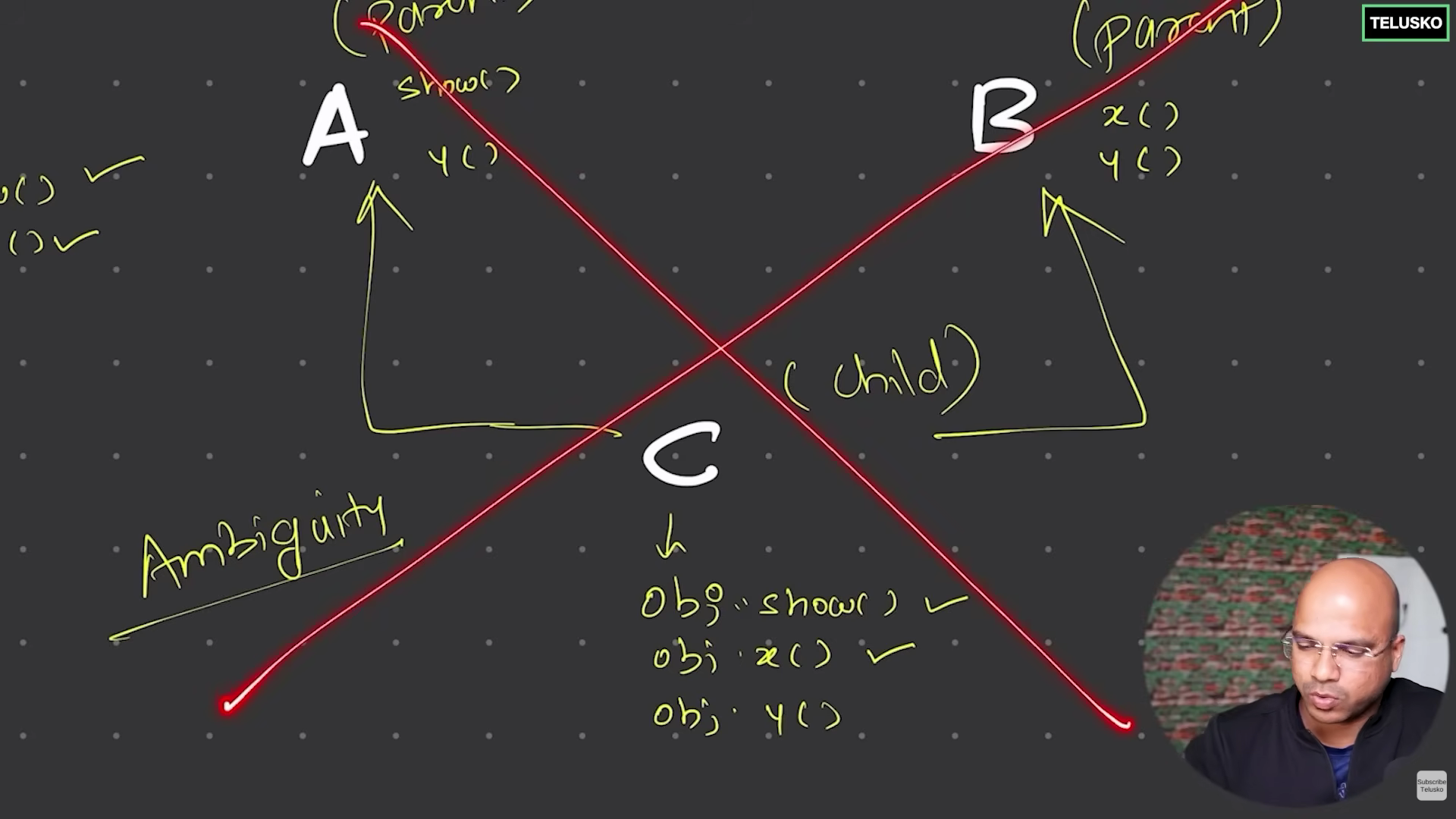
=> In java, we can make multi level inheritance. But, multiple inheritance is not valid. Because if multiple parents have a function f() defined for them, and child calls obj.f(), it is ambigious for compiler for what f() to implement.
Method over riding
Suppose parent class has add function where add(a,b) returns a+b. In child class u want to over ride parent add function and want add(a,b) to return a+b+5. Simply define similar function with modified functionality.
class A{
    public int add(int x, int y){
        return x + y;
    }
}

class B extends A{
    public int add(int x, int y){
        return x + y + 5;
    }
}

class Main{
    public static void main(String args[]){
        B obj = new B();
        System.out.println(obj.add(2,3));
    }
}
Packages
(modulariy, folder having multiple folders)
Suppose the application structure is :
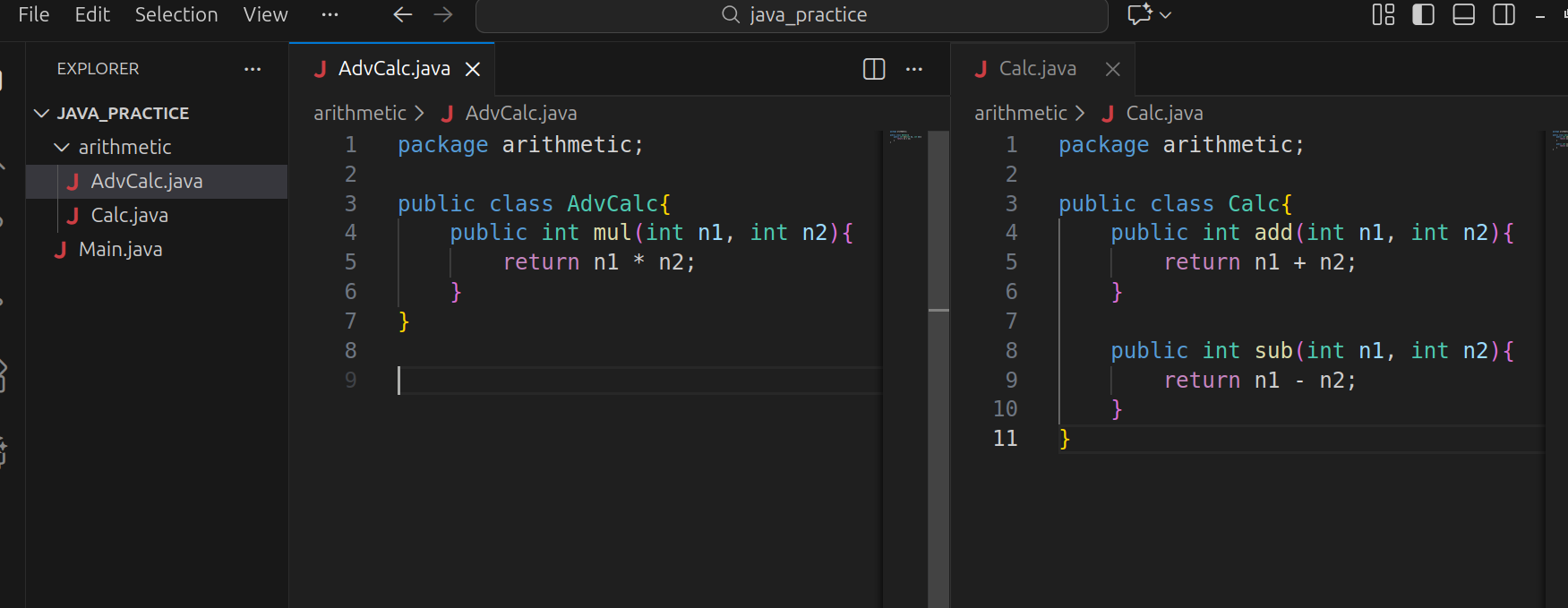
As both AdvClass.java and Class.java are present in arithmetic folder, they have first line as package arithmetic;
Now, every file is simply a class and utilising their methods require to create their objects, import the required classes from package and use em.
import arithmetic.Calc;
import arithmetic.AdvCalc;

class Main{
    public static void main(String args[]){
        Calc c = new Calc();
        AdvCalc a = new AdvCalc();

        System.out.println(c.add(2,3));
        System.out.println(a.mul(5,6));
    }
}
Now, same method is used to import built-in packages for their classes.
import java.util.ArrayList;

class Main{
    public static void main(String args[]){
        ArrayList a = new ArrayList();
    }
}
So, What's the structure behind java.util.ArrayList ??
ArrayList class is present in util folder. And util folder is present in java folder.
Then, why aren't we importing System for println() ??
System.java file has the 1st line package java.lang;
But every java file has import java.lang.* by default.
OBSERVATION:
In above Main.java, u can simply write import arithmetic.*;
ACCESS MODIFIERS:
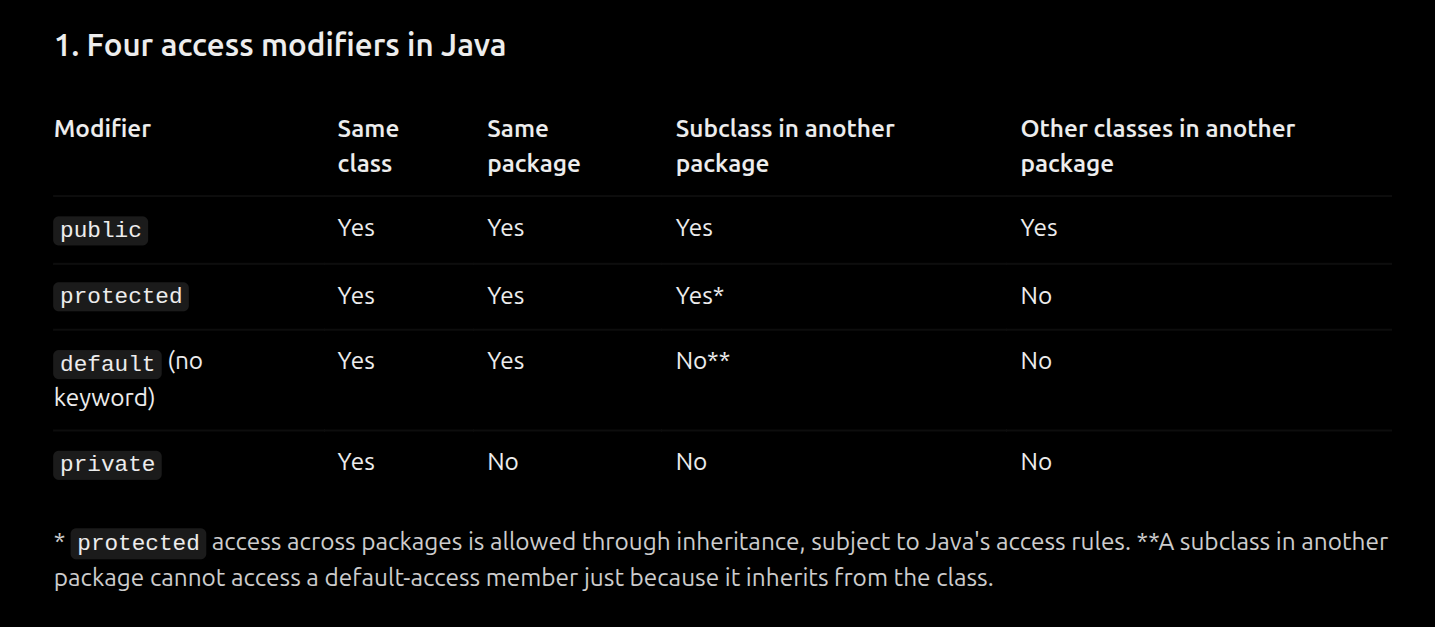
The pattern is:
Make class as public (Every file should have only 1 public class !!)
Most methods are public. when it comes to variables:
protected allows child class to use them, default allows only within package classes, but private allows only (methods, variables, ..) of same class only.
Note:
Ensure, everything should be either public / protected / private mostly.
Default is not encouraged at all.
Polymorphism
( behaving in many ways )
Java has 2 types of polymorphism:
Compile time polymorphism / Method over loading
Run time polymorphism / Method over riding
In compile time, we can expect what method will execute at compile time. where as in run time, we can decide at run time only.
When talking about run time:
CASE 1: we're already familiar with this !!
class A{
    void show(){
        System.out.println("In A show");
    }
}

class B extends A{
}

class Main{
    public static void main(String args[]){
        B obj = new B();
        obj.show();

        // op = A show, reason = inheritance
    }
}
Now,
class A{
    void show(){
        System.out.println("In A show");
    }
}

class B extends A{
    void show(){
        System.out.println("In B show");
    }
}

class Main{
    public static void main(String args[]){
        B obj = new B();
        obj.show();

        // op = B show, reason = over-riding
    }
}
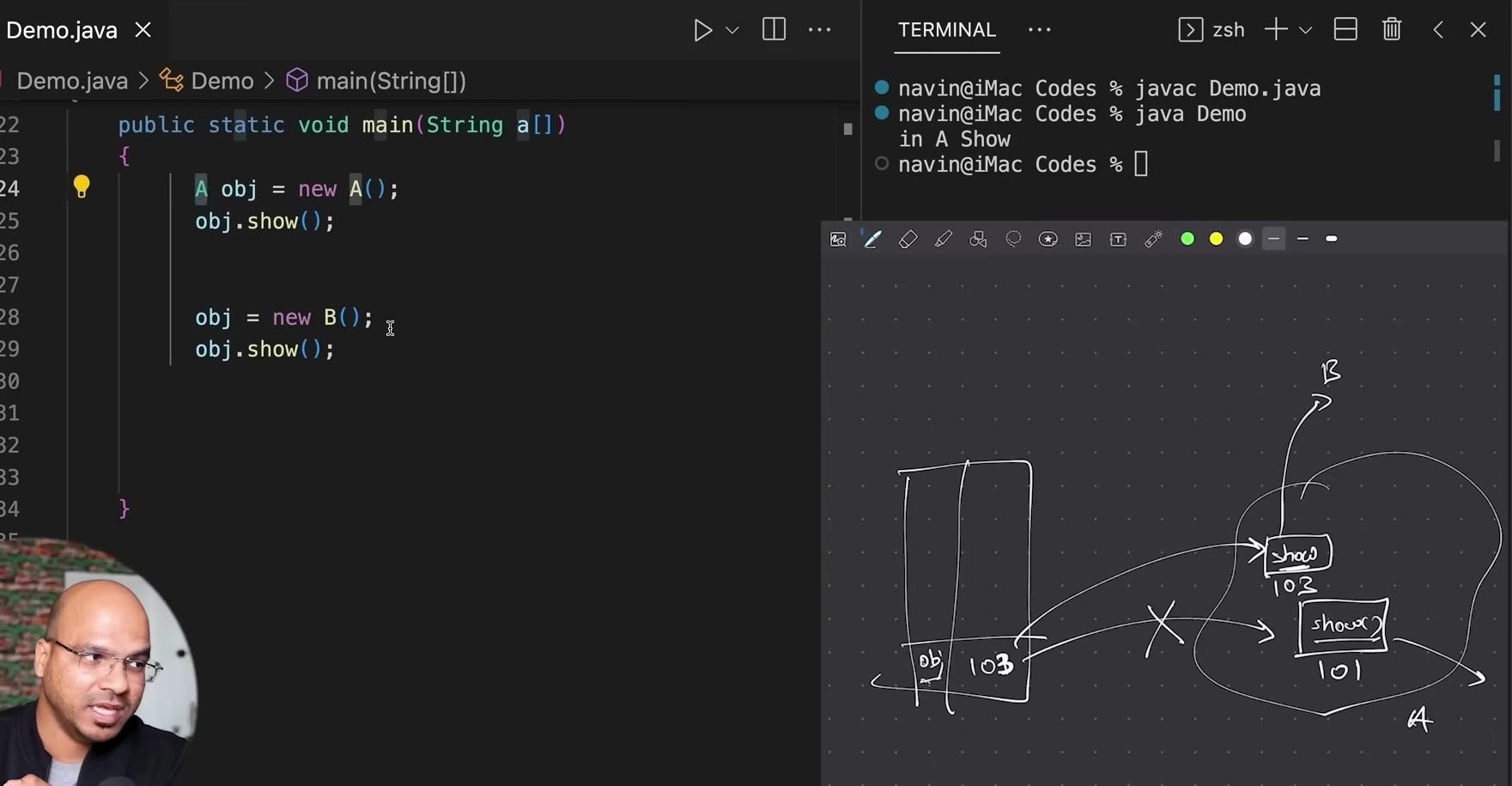
CASE 2: Storing another type of object in variable of type A
Also known as Dynamic method dispatch
class A{
    void show(){
        System.out.println("In A show");
    }
}

class B extends A{
    void show(){
        System.out.println("In B show");
    }
}

class C extends A{
    void show(){
        System.out.println("In C show");
    }
}

class Main{
    public static void main(String args[]){

        A obj = new A();
        obj.show(); // A show

        obj = new B();
        obj.show(); // B show

        obj = new C();
        obj.show(); // C show

    }
}
Even though obj variable is of type A, child methods will only work.
class A{
    void show(){
        System.out.println("In A show");
    }
}

class B{
    void show(){
        System.out.println("In B show");
    }
}

class Main{
    public static void main(String args[]){

        A obj = new B(); // Compile time error !!
        obj.show();
    }
}
Forget about run time, this is a compile time error now, because B is not a child of A. So, A obj can't allow other types to store.
UP CASTING AND DOWN CASTING:
class A{
    public final void show1(){
        System.out.println("Hello from A");
    }
}
class B extends A{
    public void show2(){
        System.out.println("Hello from B");
    }
}
class Main{
    public static void main(String args[]){
        A obj = new B();
        obj.show1();    // Hello from A
        obj.show2();    // compile error !!
    }
}
For obj, object type is B but reference type is A. So, compiler checks for show1() from class A and executes. As show2() not present in A, the compiler will throw error.
But storing obj in B type variable gives error as A is not child of B.
class Main{
    public static void main(String args[]){
        A obj = new B();
        B obj1 = obj;
    }
}
SOLUTION: DOWN CASTING.
( converting parent reference to child reference. )
class Main{
    public static void main(String args[]){
        A obj = new B();
        B obj1 = (B) obj;
        obj1.show2();
    }
}
and UP CASTING (child reference to parent, already seen in dynamic dispatch)
A obj = new B();
final keyword:
final keyword can be used for a variable, method, class.
- final variable:
In c++, Js to make constant variables, we use const keyword. Similarly in java, to make a constant variable, we use final keyword.
class Main{
    public static void main(String args[]){
        int a = 5;
        a = 10;     // valid

        final int b = 20;
        b = 30;     // error !!
    }
}
- final class:
When u make a class final, no one can inherit it.
final class A{

}
class B extends A{    // error !!

}
- final method:
When u make a method final, no one can override it.
class A{
    public final void show(){
        System.out.println("Hello from A");
    }
}

class B extends A{
    public void show(){ // error !!
        System.out.println("Hello from B");
    }
}
abstract keyword:
U can declare a method without defining it. Cause, different children may define it differently.
class A{
    public void show();
}
But above syntax throws error. To fix, make class A abstract and ur desired method show abstract.
abstract class A{
    public abstract void show();
}

class B extends A{
    public void show(){
        System.out.println("Showing B");
    }
}

class C extends A{
    public void show(){
        System.out.println("Showing C");
    }
}
Rules for abstract:
If parent class is abstract (has a abstract method), every child should ovverride it.
U cannot create an object of abstract class, u can only create child type objects, but referencing variable can be parent type.
class Main{
    public static void main(String args[]){
        A obj1 = new A(); // in valid
        B obj2 = new B(); // valid
        A obj3 = new C(); // valid
    }
}
- A class can be abstract with only normal methods and zero abstract methods, literally can have any type of methods.
Inner Class
Suppose u have a class inside another class, how to access methods and variables of inner class ??
class A{
    public void show(){
        System.out.println("show from A");
    }

    class B{
        public void config(){
            System.out.println("config from B");
        }
    }
}

class Main{
    public static void main(String args[]){
        A obj1 = new A();
        A.B obj2 = obj1.new B();
        obj2.config();
    }
}
step 1: Create obj of type A.
step 2: Create obj of type B by:
Reference type: directly can't write B, so mention path A.B
Object type: Methods / variables / inner classes of A can only be accessed by object of A. so A. new B();
What if class B is static ?? ( no need to create B object )
A.B.config();
Anonymous Inner Class
An anonymous inner class in Java is a class without a name that you declare and instantiate in a single statement.
It is useful when you want to override a method or provide an implementation for a class or interface without creating a separate named class.
class A {
    public void show() {
        System.out.println("show from A");
    }
}

// Now, if you want to override show(), you create another class:

class B extends A {
    public void show() {
        System.out.println("show from B");
    }
}

// This works, but you created a separate named class B.
Instead:
class A{
    public void show(){
        System.out.println("show from A");
    }
}

class Main{
    public static void main(String args[]){
        A obj1 = new A(){
            public void show(){
                System.out.println("From anonymous class");
            }
        };

        A obj2 = new A();
        A obj3 = new A();

        obj1.show();    // from anonymous
        obj2.show();    // from A
        obj3.show();    // from A
    }
}
Logical thing for u !!
abstract class A{
    public abstract void show();
}

class B extends A{
    public void show(){
        System.out.println("show from B");
    }
}

class Main{
    public static void main(String args[]){
        A obj1 = new B();
        obj1.show();
    }
}
can also be written as:
abstract class A{
    public abstract void show();
    public abstract void config();
}

class Main{
    public static void main(String args[]){
        A obj1 = new A(){
            public void show(){
                System.out.println("show from B");
            }
            public void config(){
                System.out.println("config from B");
            }
        };
        obj1.show();
    }
}
Interface:
Suppose u made a class with only abstract methods and zero normal methods. Instead, we can make a interface.
abstract class A{
    public abstract void show();
    public abstract void config();
}
Interface vs abstract class
Interface is not a class.
By default, every method in interface is public abstract.
Similar to abstract class, we can't create object of interface, but we can use interface as reference type.
abstract class : extends :: interface : implements [ class - interface ]
By default, variables in interface are static and final, so initialise when decalring them.
Unlike abstract class, u can implement multiple interfaces.
Class B implements interface P, Q, ....... But interface X extends interface Y (inheritance in interface). So child interface gets abstract methods of parent interface, and object of child interface should implement all methods of parent interface.
interface A{
    int version = 6.2;
    String model = "java";
    void show();
    void config();
}

class B implements A{
    public void show(){
        System.out.println("Showing in B");
    }

    public void config(){
        System.out.println("config in B");
    }
}

class Main{
    public static void main(String args[]){
        A obj = new B();
        obj.show();
        obj.config();
    }
}
interface A{
    void run();
}

interface B{
    void fly();
}

class C implements A, B{
    public void run(){
        System.out.println("running in C");
    }

    public void fly(){
        System.out.println("flying in C");
    }
}

interface D extends B{
    void swim();
}
- Suppose there exists interface A and class B and B implements A. U create A obj = new B(); Then, obj can only implement methods of A but not B (seen in downcasting)
interface A{
    void show();
    void config();
}

interface X{
    void run();
}

class B implements A, X{
    public void show(){
        System.out.println("Showing in B");
    }

    public void config(){
        System.out.println("config in B");
    }

    public void run(){
        System.out.println("running in B");
    }
}

class Main{
    public static void main(String args[]){
        A obj = new B();
        obj.show();
        obj.config();
        obj.run();        // invalid, can only implement A methods

        X obj1 = new B();
        obj1.run();       // valid
    }
}
WHAT'S THE NEED OF INTERFACE ??
Suppose u are a sde in a company, got laptop for coding.
class Laptop{
    void code(){
        System.out.println("coding in laptop");
    }
}

class Sde{
    void devApp(Laptop l){
        l.code();
    }
}

class Main{
    public static void main(String args[]){
        Sde raj = new Sde();
        Laptop l = new Laptop();
        raj.devApp(l);
    }
}
- Suppose laptop got extinct, and u were given desktop to code, but devApp() of Sde can only take Laptop as input ?? Solution: abstract class
abstract class Computer{
    abstract void code();
}

class Laptop extends Computer{
    void code(){
        System.out.println("coding in laptop");
    }
}

class Desktop extends Computer{
    void code(){
        System.out.println("coding in desktop");
    }
}

class Sde{
    void devApp(Computer c){
        c.code();
    }
}

class Main{
    public static void main(String args[]){
        Sde raj = new Sde();
        Laptop l = new Laptop();
        Desktop d = new Desktop();

        raj.devApp(l);
        raj.devApp(d);
    }
}
- Now, a cleaner implementation is interface. So, interface helps in abstracting the working logic of different components but helps to use different methods under same reference type (here Computer).
Enums
In Java, an enum (enumeration) is a special class used to define a fixed set of named constants. It improves type safety and readability by restricting a variable to one of the predefined values.
enum Status{
    Working, Failed, Blocked
}

public class Main{
    public static void main(String args[]){
        Status s = Status.Blocked;
        System.out.println(s);  // Blocked
        System.out.println(s.ordinal());    // 2 (index)

        Status[] a = Status.values();
        for(Status st : a){
            System.out.print(st + " " + st.ordinal() + "\n");
        }
    }
}
Enums in If else block:
enum Status{
    Working, Failed, Blocked
}

public class Main{
    public static void main(String args[]){
        Status s = Status.Blocked;
        System.out.println(s);

        if(s == Status.Working) System.out.println("Alive");
        else if(s == Status.Failed) System.out.println("Dead");
        else System.out.println("Fix");
    }
}
Enums in switch case:
enum Status{
    Working, Failed, Blocked
}

public class Main{
    public static void main(String args[]){
        Status s = Status.Blocked;
        System.out.println(s);

        int points = 0;
        switch(s){
            case Working: points += 5; break;
            case Failed: points = 0; break;
            case Blocked: points -= 2; break;
            default: System.out.println("invalid");
        }
        System.out.println(points);
    }
}
Enum can't extend a class, and a class extend a enum. But enum can have fields, constructors and methods similar to a class. Enum can implement multiple interfaces.
enum extends java.lang.Enum
enum Laptop{
    macbook(1000), thinkpad(2000), pavilion(3000);
    private int price;
    private Laptop(){price = 500;}
    private Laptop(int p){price = p;}
    public int getPrice(){return price;}
}

class Main{
    public static void main(String args[]){
        Laptop l = Laptop.pavilion;
        System.out.println(l.getPrice());   // 3000
        for(Laptop p : Laptop.values()){
            System.out.print(p + " " + p.getPrice() + "\n");
        }
    }
}
Functional Interface
A functional interface in Java is an interface that contains exactly one abstract method. It can have multiple default and static methods.
It is also called a SAM (Single Abstract Method) interface.
@FunctionalInterface
interface Computer {
    void code();
}

class Main {
    public static void main(String[] args) {
        Computer c = new Computer() {
            public void code() {
                System.out.println("Coding...");
            }
        };

        c.code();    // Coding
    }
}
LAMBDA EXPRESSIONS (A syntactic sugar)
@FunctionalInterface
interface Computer {
    void code();
}

class Main {
    public static void main(String[] args) {
        Computer c = () -> System.out.println("Coding...");

        c.code();
    }
}
Lambda Expressions with parameters and return value
@FunctionalInterface
interface Calculator {
    int operate(int a, int b);
}

class Main {
    public static void main(String[] args) {
        Calculator add = (a, b) -> a + b;
        Calculator multiply = (a, b) -> a * b;

        System.out.println(add.operate(10, 20));
        System.out.println(multiply.operate(10, 20));
    }
}
Notice something important: the same interface can have different implementations through different lambda expressions.
Comments
Join the discussionNo comments yet. Be the first to comment.