Core Java
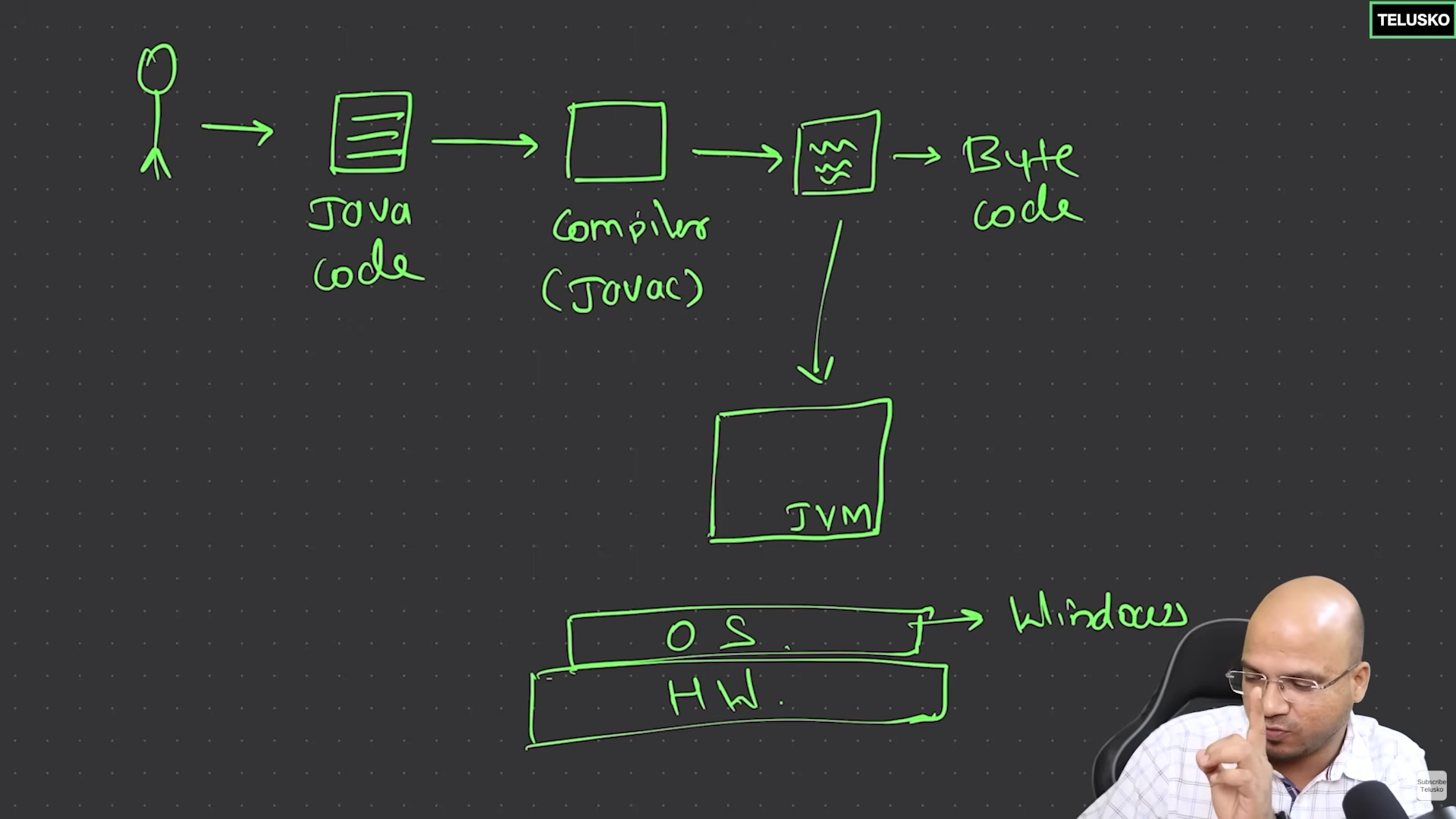
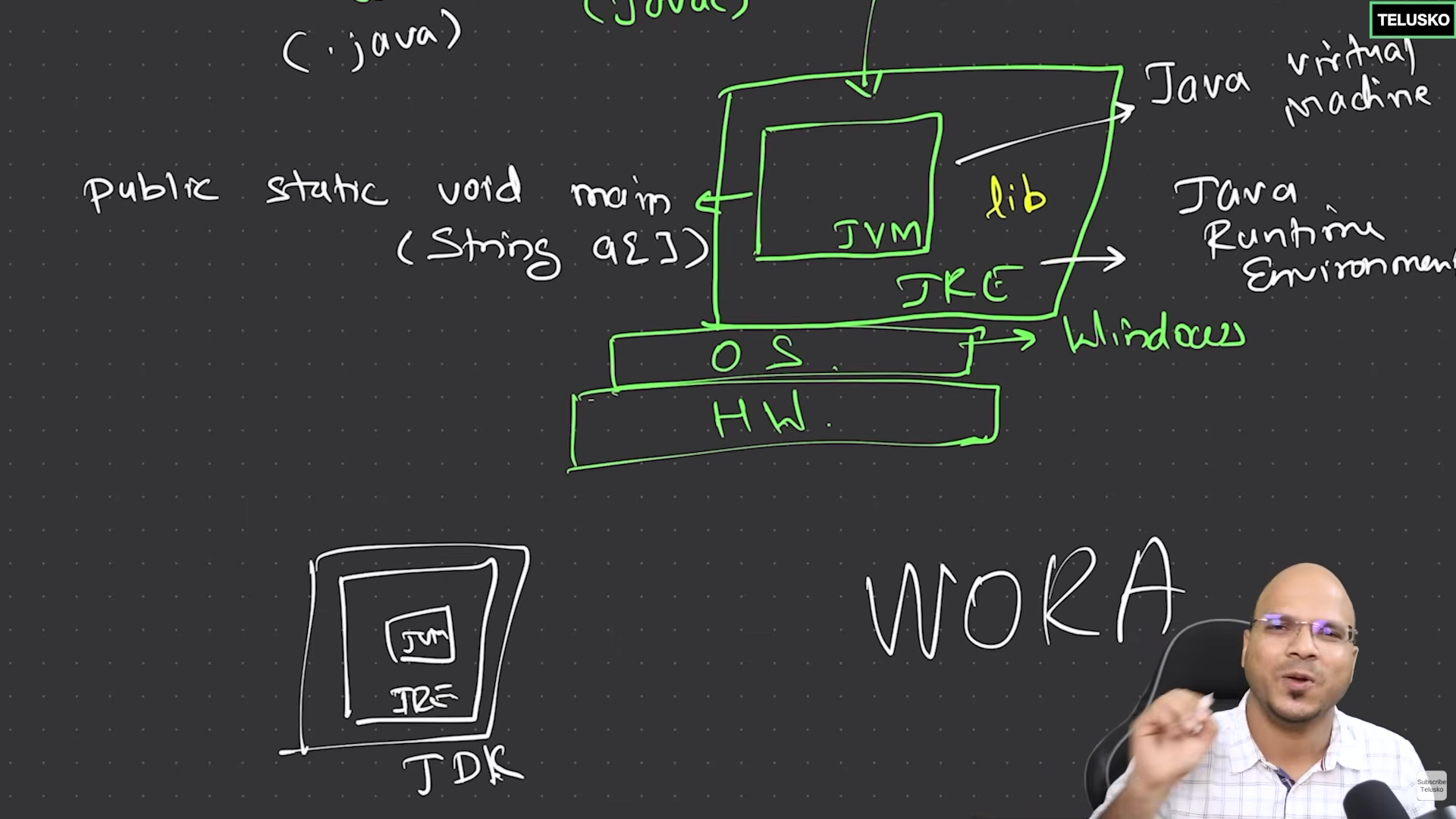
BASIC JAVA PROGRAM:
"Suppose ur application had a 1000 files, but only 1 file gets executed. That file might depend on all other files. That file should have a main function."
class Hello{
    public static void main(String args[]){
        int a = 5, b = 3;
        System.out.println(a+b);
    }
}
DATA TYPES:
class Hello{
    public static void main(String args[]){
        int a = 5, b = 3;          // 4 bytes
        long l = 123456l;          // 8 bytes
        float f = 1.2345f;         // 4 bytes
        double d = 1.2345678;      // 8 bytes, default

        char c = 'h';              // 2 bytes
        boolean eligible = true;
    }
}
class Hello{
    public static void main(String args[]){
        int a = 0b101;     // binary
        int b = 0x7E;      // hexa decimal
        int c = 1_00_000;  // readable big numbers
        System.out.printf("%d %d %d \n",a,b,c);    // 5 126 100000

        float  f = 1.2367f;
        double d = 12e5;
        System.out.printf("%.3f %f \n", f, d); //1.237 1200000.00

        char x = 'a';
        x+=2; x--;
        System.out.printf("%c \n", x); // b
    }
}
TYPE CONVERSION AND CASTING:
implicit conversion means storing small value in big container
Explicit conversion is also known as type casting.
class Hello{
    public static void main(String args[]){

        // implicit conversion
        byte b = 127;
        int c = b;

        // explicit conversion
        int d  = 57;
        byte e = (byte) d;  // 57
        byte p = (byte) 300; // 300 % 256
        // byte e = d, f = 300;   lossy conversion error

        float f = 5.7f;
        int g = (int) f;    // 5
    }
}
CONDITIONAL STATEMENTS
class Hello{
    public static void main(String args[]){
        int marks = 86;
        char grade = '-';

        if(marks >= 90) grade = 'A';
        else if(marks >= 70) grade = 'B';
        else grade = 'C';

        System.out.println(grade);

        // TERNARY OPERATORS
        int salary = 34000;
        int bonus = (salary > 20000) ? 6000 : 2000;

        // SWITCH STATEMENT

        int month = 15;
        switch(month){
            case 1:
                System.out.println("Republic Day");
                break;
            case 8:
                System.out.println("Independence Day");
                break;
            case 10:
                System.out.println("Gandhi Jayanti");
                break;
            default:
                System.out.println("No holiday");
        }
    }
}
LOOPS
class Hello{
    public static void main(String args[]){

        // WHILE LOOP
        int i = 0;
        while(i<10){
            System.out.printf("Iteration %d \n", i);
            i++;
        }

        // FOR LOOP
        int total = 0;
        for(int j=0; j<5; j++) total += 10;

        // DO-WHILE LOOP
        int k = 0;
        do{
            System.out.printf("Iteration %d \n", k);
            k++;
        }while(k<8);
    }
}
CLASSES AND OBJECTS
class Calculator{
    int id; String country;

    public Calculator(){
        id = 1;
        country = "";
    }

    public Calculator(string c){
        country = c;
    }

    public String greet(){
        return "Hello, user !!";
    }

    public int add(int a, int b){
        return a + b;
    }
}

class Hello{
    public static void main(String args[]){
        int x = 56, y = 19;
        Calculator c = new Calculator();

        String msg = c.greet();
        System.out.println(msg);

        int result = c.add(x, y);
        System.out.println(result);

        System.out.println(c.id);
    }
}
- METHOD OVER LOADING:
class Calculator{
    public int add(int a, int b){
        return a + b;
    }
    public int add(int a, int b, int c){
        return a + b + c;
    }
    public double add(double a, double b, double c){
        return a + b + c;
    }
}
ARRAYS
class Main{
    public static void main(String args[]){
        // u should some how mention array size initially.

        // 1d array
        int arr1[] = {11,28,36,40};
        int arr2[] = new int[5];

        for(int i=0; i<5; i++) arr2[i] = 4 * i;
        System.out.println(arr2[3]);
        for(int x: arr2) System.out.println(x);

        // multi dimensional array
        int nums1[][] = new int[2][3];
        int nums2[][] = {{0,1,2}, {1,2,3}};

        System.out.println(nums2[1][2]);
        for(int temp[]: nums2){
            for(int x: temp) System.out.println(x);
        }

        // jagged array => variable column size
        int nums[][] = new int[3][];
        nums[0] = new int[2];
        nums[1] = new int[8];
        nums[2] = new int[5];

        for(int i=0; i<nums.length; i++){
            for(int j=0; j<nums[i].length; j++){
                nums[i][j] = i + j;
            }
        }

    }
}
class Student{
    String name;
    int id, marks;
}

class Hello{
    public static void main(String args[]){
        Student s1 = new Student();
        s1.name = "Alex";
        s1.id = 1;
        s1.marks = 99;

        Student s2 = new Student();
        s2.name = "Boris";
        s2.id = 2;
        s2.marks = 53;

        Student s3 = new Student();
        s3.name = "Charles";
        s3.id = 3;
        s3.marks = 77;

        Student students[] = new Student[3];
        students[0] = s1;
        students[1] = s2;
        students[2] = s3;

        for(Student s: students) System.out.printf("%d ", s.marks);
    }
}
STRINGS
String is not a primitive data type in java unlike others like int, float, char, bool ..
String is a class, so s in String is a capital letter.
String s = "java"; is equivalent to String s = new String("java");
class Main{
    public static void main(String args[]){
        String s = "hello";
        s = s.concat(" user");
        System.out.println(s);  // hello user
    }
}
How strings objects are created in heap memory ??
Suppose the code is :
class Main{
    public static void main(String args[]){
        String name = "navin";
        s1 = "Navin";
        s2 = "Navin";
    }
}
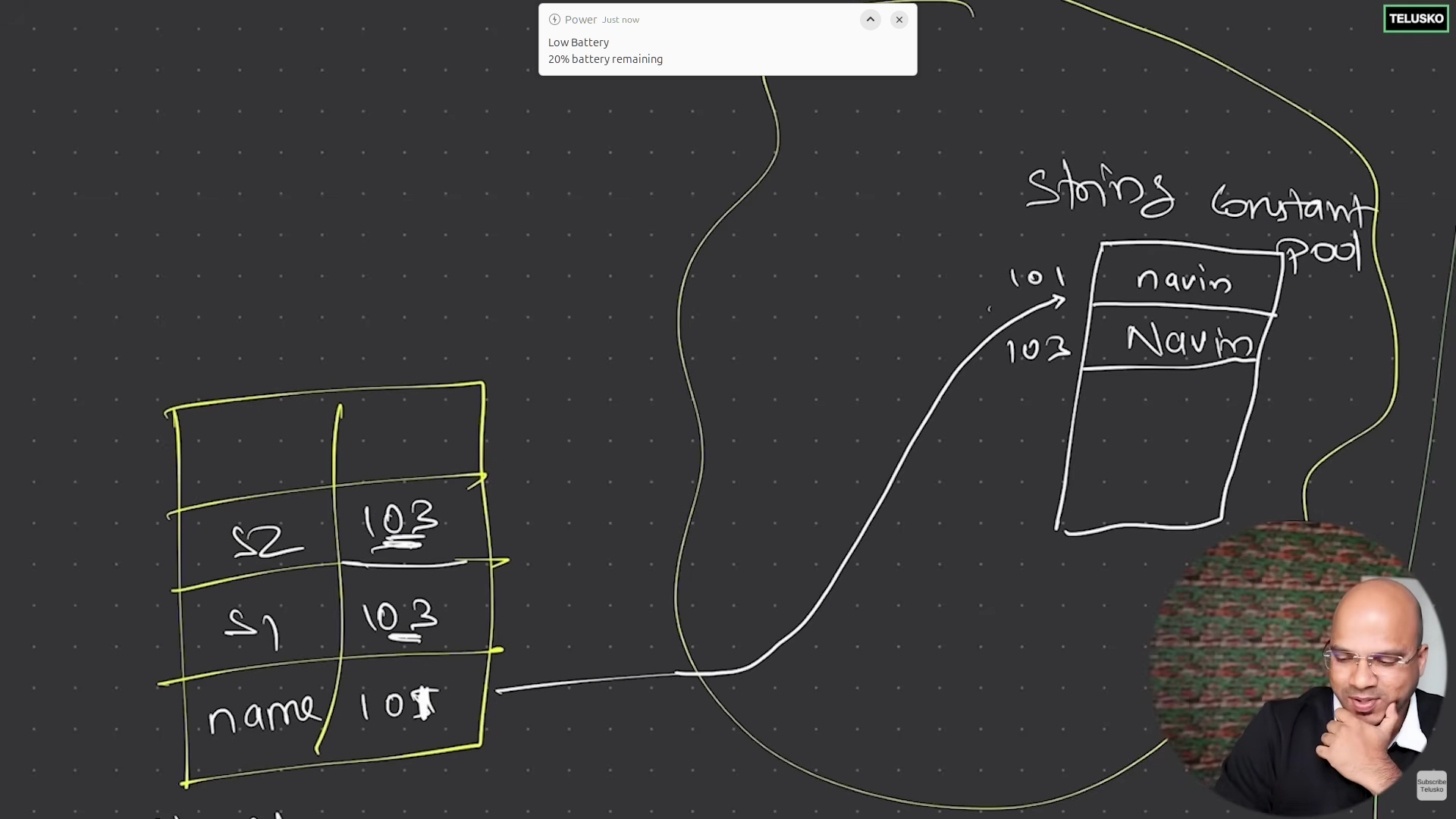
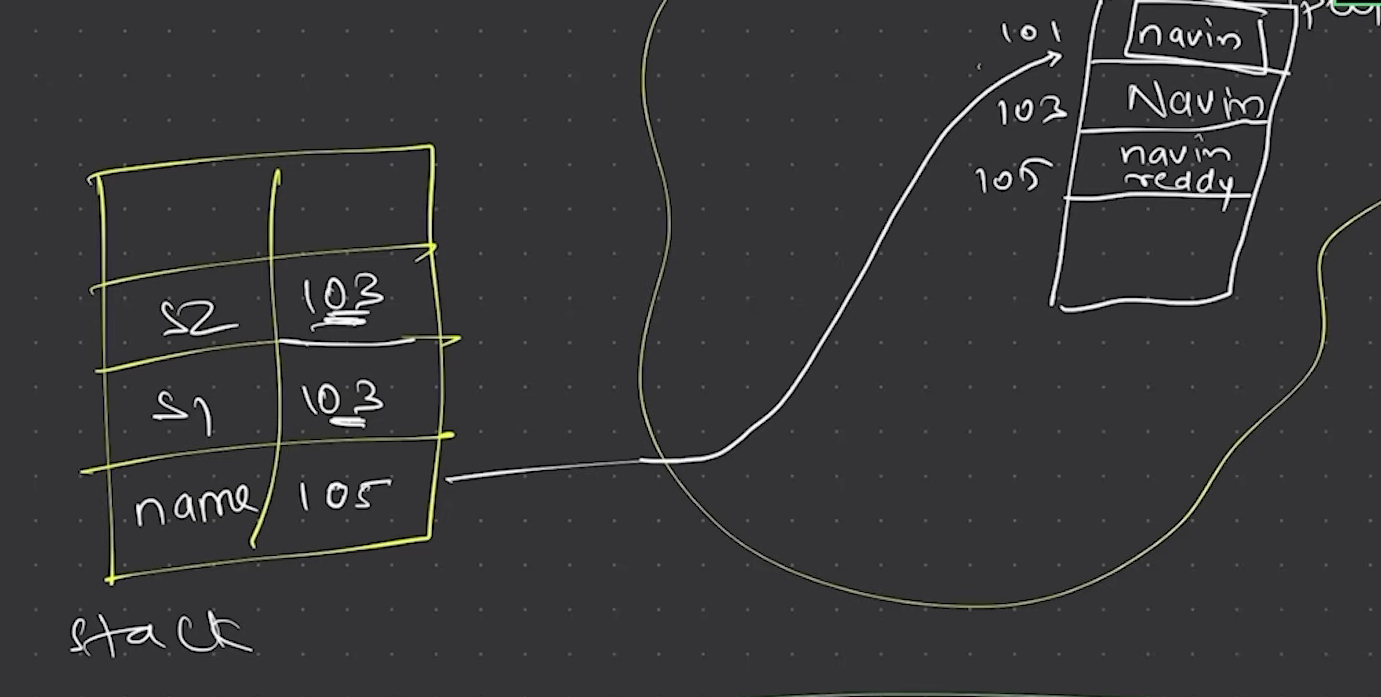
Strings are immutable (cannot be changed) by default. which means for suppose u do name = name + "reddy":
The string "navin" stays as it is at address 101, a new string "navin reddy" created at new address and name points to new address.
Now, the old string "navin" becomes eligible for garbage collection.
There are 2 ways to make mutable strings: StringBuilder and StringBuffer.
STRING BUILDER
class Main{
    public static void main(String args[]){
        StringBuffer sbf = new StringBuffer("Alexo cocoa");
        sbf.append(" fields");  // "Alexo cocoa fields"
        sbf.delete(5, 11);      // "Alexo fields"
        sbf.insert(0, "Java ");  // "Java Alexo fields"
        System.out.println(sbf.substring(0, 6)); // "Java A"

        String s = sbf.toString();

    }
}
Q: StringBuffer vs StringBuilder ??
A: StringBuffer is thread safe but StringBuilder isn't. Rest of pre defined methods are same for both.
Complete java oops from https://block-chain.hashnode.dev/core-java-2-oops for better understanding of further topics.
EXCEPTIONS
There are 3 types of errors. Compile time, run time, logical (seen in testing).
Run time errors are exceptions. And we shouldn't stop at a run time error, and do exception handling.
try catch block
class Main {
    public static void main(String[] args) {
        int i = 2;
        int result = 0;

        try{
            // critical section of code
            result = 10 / i;
        }catch(Exception e){
            System.out.println("Something went wrong..");
            System.out.println(e);
        }

        System.out.println(result);
    }
}
Note:
- catch will only implement only if exception occurs, rest will be implemented in all cases.
- If i=0 output: Something went wrong 0, else it simply prints result.
class Main {
    public static void main(String[] args) {
        int i = 2;
        int result = 0;
        int nums[] = new int[5];

        try{
            // critical section of code
            result = 10 / i;
            result += nums[5];

        }catch(ArithmeticException e){
            System.out.println("can't divide by zero");
        }catch(ArrayIndexOutOfBoundsException e){
            System.out.println("Array index out of bounds");
        }catch(Exception e){
            System.out.println("Unknown error occured");
        }

        System.out.println(result);
    }
}
throw keyword
Q: Suppose if result becomes zero, generate me a exception and reset the value to 10.
class Main {
    public static void main(String[] args) {
        int i = 0;
        int result = 0;

        try{
            result = 10 / i;
            if(result == 0) throw new ArithmeticException("result became zero");
        }catch(ArithmeticException e){
            result = 10;
            System.out.println(e);    // result became zero
        }
        System.out.println(result);
    }
}
make a custom Exception class
class JohnException extends Exception{
    public JohnException(String s){
        super(s);
    }
}

public class Main {
    public static void main(String[] args) {
        int i = 20;
        int result = 0;

        try{
            result = 10 / i;
            if(result == 0) throw new JohnException("result became zero");
        }catch(JohnException e){
            result = 10;
            System.out.println(e);
        }
        System.out.println(result);
    }
}
HOW TO TAKE INPUT FROM USER ??
Older approach:
import java.io.BufferedReader;
import java.io.InputStreamReader;
import java.io.IOException;

public class Main {
    public static void main(String[] args) throws IOException{
        // InputStreamReader object needs InputStream object as parameter
        // Instead let's pass System.in
        InputStreamReader in = new InputStreamReader(System.in);
        BufferedReader bf = new BufferedReader(in);

        System.out.println("Enter a number");
        int num = Integer.parseInt(bf.readLine());
        System.out.println(num);

    }
}
Current approach:
import java.util.Scanner;

public class Main {
    public static void main(String[] args){

        Scanner sc = new Scanner(System.in);
        System.out.println("Enter a number");
        int num = sc.nextInt();
        System.out.println(num);

    }
}
finally keyword
Consider this scenario**:**
public class Main {
    public static void main(String[] args){
        int i = 0, result = 0;
        try{
            result = 18 / i;
            System.out.println("Bye");
        }catch(Exception e){
            System.out.println("Cannot divide by zero");
        }
    }
}
Here, calculating result is critical step. So at the result calculation, if an Exception is thrown (if i == 0), rest of code under result line will never be executed and catch block or below code will be executed.
Solution:
public class Main {
    public static void main(String[] args){
        int i = 0, result = 0;
        try{
            result = 18 / i;
        }catch(Exception e){
            System.out.println("Cannot divide by zero");
        }finally{
            System.out.println("Bye");
        }
    }
}
Now Bye line will be executed, irrespective of exception.
THREADS
A thread is the smallest unit of CPU execution within a process. It represents a sequence of instructions that the CPU can execute.
In sight:
Every process (a single program) is divided into threads. And irrespective of how many threads u have, cpu scheduler allows 1 thread of application A at a time to execute, and then 1 thread of application B to execute.
Nowadays, we got multi core CPU's which can implement multiple threads at same time.
Consider this program:
class A{
    void show(){
        for(int i=0; i<100; i++) System.out.println("Hi");
    }
}

class B{
    void show(){
        for(int i=0; i<100; i++) System.out.println("Hello");
    }
}

public class Main {
    public static void main(String[] args){
        A obj1 = new A();
        B obj2 = new B();
        obj1.show();
        obj2.show();
    }
}
Hi will be printed 100 times. Only then, Hello will be printed 100 times. What if we want parallel execution of obj1.show() and obj2.show() ??
Approach:
class A extends Thread{
    public void run(){
        for(int i=0; i<100; i++){
            System.out.println("Hi");
        }
    }
}

class B extends Thread{
    public void run(){
        for(int i=0; i<100; i++){
            System.out.println("Hello");
        }
    }
}

public class Main {
    public static void main(String[] args){
        A obj1 = new A();
        B obj2 = new B();
        obj1.start();
        obj2.start();
    }
}
- Extend thread class to class A and class B to utilise benefits of threads for those methods.
- After extending, the object should call start(), and that start() will implement run() function of that class with threads.
Another Approach to utilise threads:
Runnable is parent class of Thread. So extend Runnable class, create the objects of A, B and pass them as parameters to Thread objects.
class A implements Runnable{
    public void run(){
        for(int i=0; i<100; i++){
            System.out.println("Hi");
        }
    }
}

class B implements Runnable{
    public void run(){
        for(int i=0; i<100; i++){
            System.out.println("Hello");
        }
    }
}

public class Main {
    public static void main(String[] args){
        Runnable obj1 = new A();
        Runnable obj2 = new B();

        Thread t1 = new Thread(obj1);
        Thread t2 = new Thread(obj2);

        t1.start();
        t2.start();
    }
}
COLLECTIONS
In this topic, we have 3 topics. Collection (Interface), Collections (Class), Collection API.
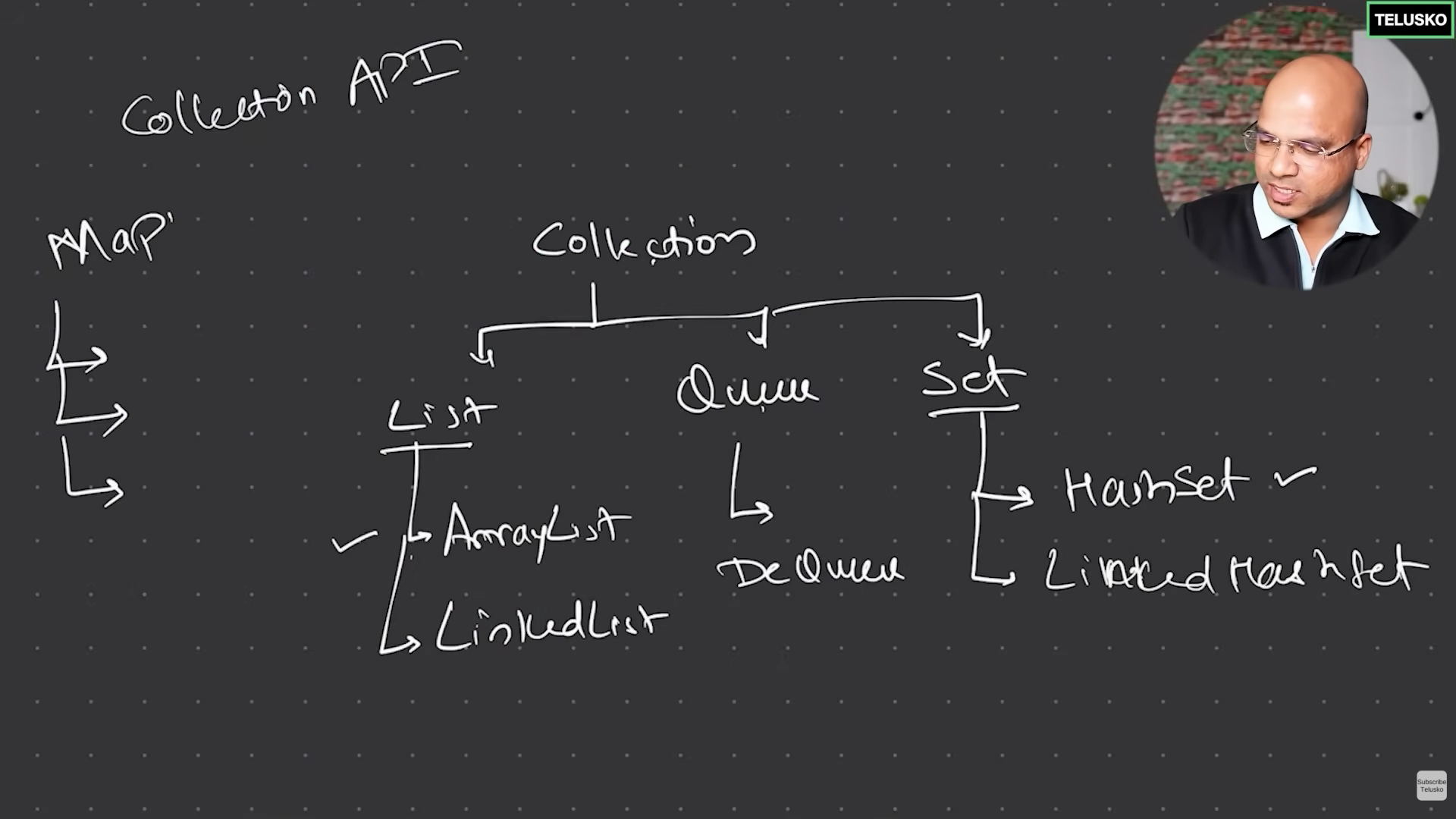
import java.util.Collection;
import java.util.ArrayList;
public class Main{
    public static void main(String args[]){
        Collection<Integer> nums = new ArrayList<Integer>();
        nums.add(6);
        nums.add(10);
        System.out.println(nums);    // [6, 10]
    }
}
Collection doesn't support Indexing. So, let us use List.
import java.util.List;
import java.util.ArrayList;
public class Main{
    public static void main(String args[]){
        List<Integer> nums = new ArrayList<Integer>();
        nums.add(6);
        nums.add(10);
        System.out.println(nums.get(1));    // 10
    }
}
Let us store Set to store unique values.
import java.util.Set;
import java.util.HashSet;
public class Main{
    public static void main(String args[]){
        Set<Integer> nums = new HashSet<Integer>();
        nums.add(66);
        nums.add(10);
        System.out.println(nums);        // [66, 10]
    }
}
Let us use Map for storing key, value pairs.
import java.util.Map;
import java.util.HashMap;

public class Main{
    public static void main(String args[]){
        Map<String, Integer> m = new HashMap<String, Integer>();
        m.put("raj", 100);
        m.put("alex", 45);
        m.put("david", 39);

        System.out.println(m);  // {entire map}
        System.out.println(m.get("david"));
        m.put("alex", 76);  // update

        System.out.println(m.keySet()); // {set of all keys}
        for(String key: m.keySet()){
            System.out.println(key + " " + m.get(key));
        }
    }
}
Sorting
- Ascending sorting of list
import java.util.List;
import java.util.ArrayList;
import java.util.Collections;

public class Main{
    public static void main(String args[]){
        List<Integer> l = new ArrayList<Integer>();
        l.add(34);
        l.add(76);
        l.add(23);
        l.add(12);
        l.add(100);

        System.out.println(l);  // [34, 76, 23, 12, 100]
        Collections.sort(l);
        System.out.println(l);  // asc sorted list
    }
}
- Custom sorting logic with comaparator
import java.util.List;
import java.util.ArrayList;
import java.util.Collections;
import java.util.Comparator;

public class Main{
    public static void main(String args[]){

        Comparator<Integer> com = new Comparator<Integer>(){
            public int compare(Integer i, Integer j){
                int result = (i % 10 > j % 10) ? 1 : -1;    // yes / no
                return result;
            }
        };

        List<Integer> arr = new ArrayList<Integer>(List.of(23, 67, 100, 89));
        Collections.sort(arr, com);
        System.out.println(arr);


    }
}
Comments
Join the discussionNo comments yet. Be the first to comment.